
Service log
Every job, on the record
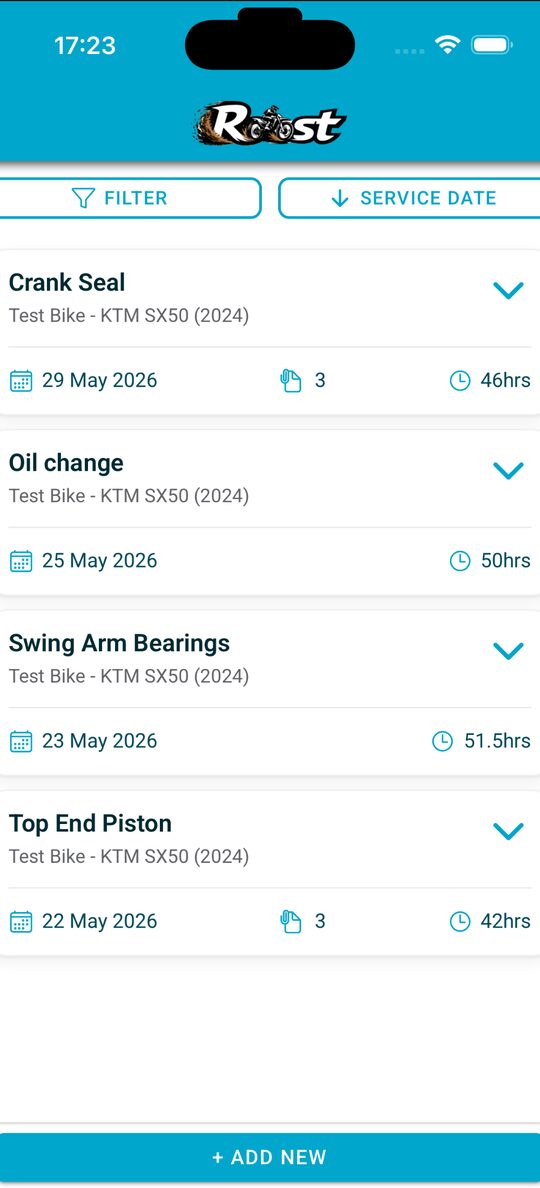
Oil, filters, valves, tyres, chain: log the job with hours, parts and cost, add a photo of the receipt, and see when each item is next due. Reminders are based on the hours you actually ride.
 The rider's app
Roost MX Garage logs every service, jetting run and clicker setup against the right bike and the exact conditions you rode in, so the setup that worked is one tap away next time. Free on iOS and Android.
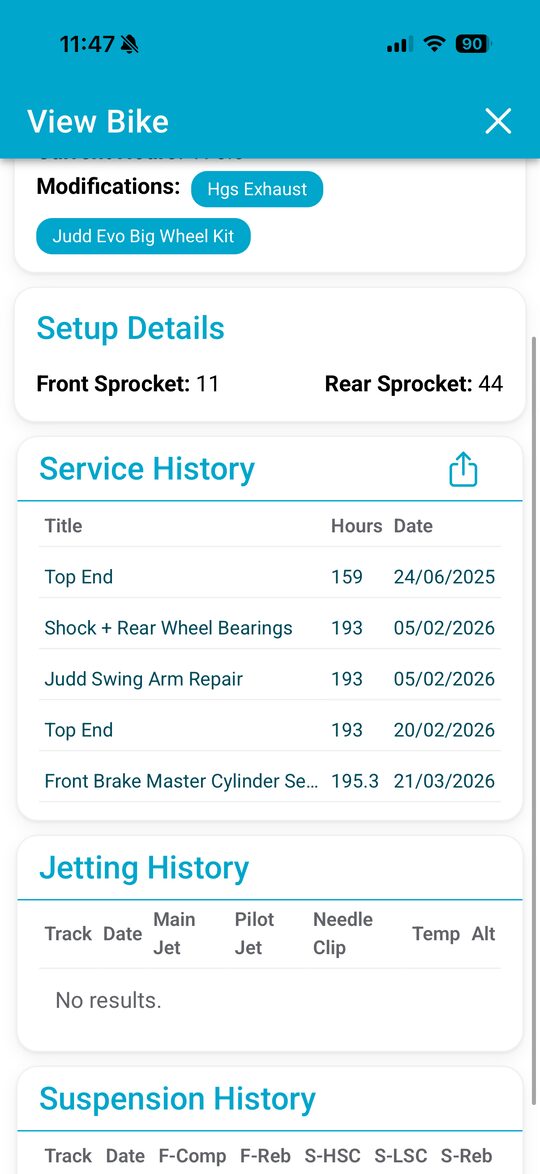
Built for riders who keep more than one bike and want to stop guessing from memory after the last ride.
Service log
Oil, filters, valves, tyres, chain: log the job with hours, parts and cost, add a photo of the receipt, and see when each item is next due. Reminders are based on the hours you actually ride.
Jetting
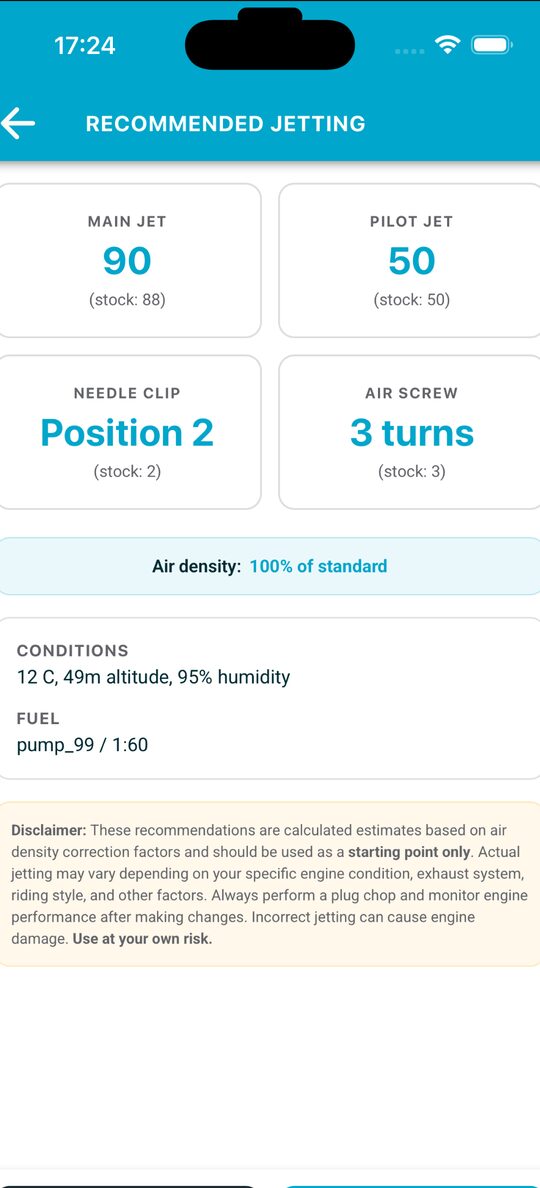
Save the main, pilot, needle and clip with the weather at the track. The app pulls temperature, humidity and elevation for you, corrects for air density and suggests a starting point for the next day out. Read the jetting guide.
Suspension
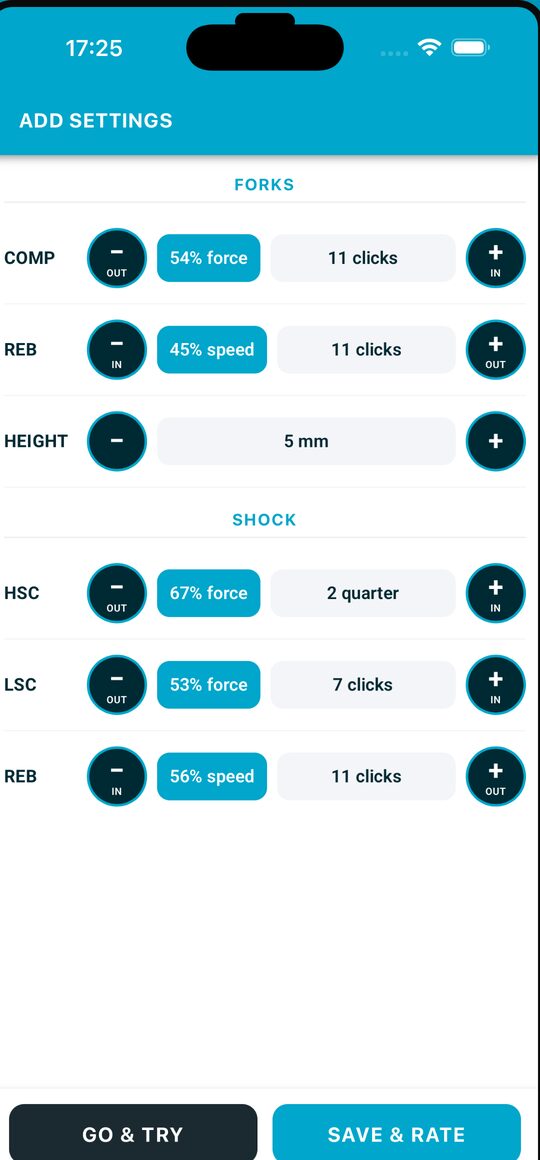
Compression and rebound, front and rear, high and low speed, saved per track. Go back to exactly what worked instead of guessing from memory after the next ride.
Roost Pro
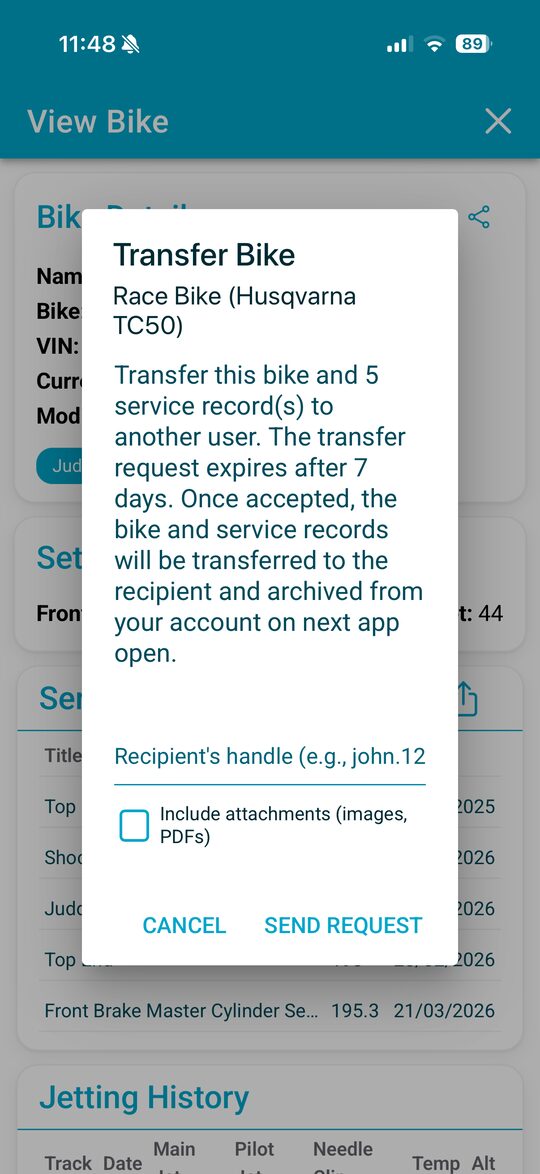
Pro turns a bike's complete record into a clean PDF for your files, your insurer or a buyer. When you sell, transfer the bike to the new owner's Roost handle and the full history, photos and invoices go with it.
The privacy policy, terms of service, support details and how to delete your account, all on this page.
This privacy policy explains how the Roost MX mobile application ("Roost MX", "we", "us", "the app") collects, uses, stores, and shares information when you use the app on Android, iOS, or the web.
Roost MX is a personal motorcycle service log: you record your bikes, service history, jetting setups, and suspension setups, optionally attaching photos and PDFs. The app uses your location only to fetch local weather conditions to help calculate jetting recommendations.
The data controller responsible for your personal data is Roost MX Ltd, a private limited company registered in England and Wales (company number 17450512), the developer of Roost MX. You can contact us at:
Camera and photo library access is only used when you choose to attach an image to a service record. The app does not record video, take photos in the background, or access photos unrelated to attachments you explicitly add. You can revoke camera and photo library permissions at any time in your device settings.
| Purpose | Data used | Lawful basis (UK GDPR Art. 6) |
|---|---|---|
| Create and maintain your account | Email, password, name | Performance of contract |
| Save and sync your bikes, services, configurations | Profile + content | Performance of contract |
| Authenticate API requests | Auth tokens | Legitimate interest (security) |
| Calculate jetting recommendations | One-time location lookup → weather + elevation | Legitimate interest (you initiated the action) |
| Improve the app and diagnose crashes | Anonymous usage events, crash reports | Legitimate interest |
| Provide customer support | Email + relevant account context | Legitimate interest |
We use Google Firebase (operated by Google LLC and Google Cloud EMEA Limited) as our backend platform. Firebase data is stored in Google's data centres. The Firebase services we use are:
Google's privacy and security practices are described at firebase.google.com/support/privacy.
When you tap "Use my location" or "Recalculate with current weather", the app sends your latitude and longitude to open-meteo.com to fetch temperature, humidity, and elevation. Open-Meteo's privacy policy is at open-meteo.com/en/terms. We do not receive or store your coordinates ourselves.
Google or Apple may collect basic device and account information when you install or update the app. That collection is governed by their privacy policies, not ours.
Firebase data may be processed in regions outside the UK or EEA, including the United States. Google relies on the EU-US Data Privacy Framework and Standard Contractual Clauses to safeguard such transfers. See cloud.google.com/terms/data-processing-addendum.
You have the right to:
To exercise any of these rights, email tristinwhiteqtec@gmail.com. We will respond within 30 days.
You can delete your account at any time:
Data in transit is encrypted via HTTPS / TLS 1.2+. Data at rest in Firebase is encrypted using Google-managed keys. Authentication uses industry-standard token-based mechanisms. Locally cached data on your device is stored in the operating system's app sandbox; we recommend using a device passcode or biometrics. No system is perfectly secure, but we apply reasonable technical and organisational measures appropriate to the risk.
Roost MX is not directed at children under 13 (or under 16 in the UK and EEA). We do not knowingly collect personal data from children under those ages. If you believe a child has provided personal data, contact us and we will delete it promptly.
The app uses local storage on your device (IndexedDB, Capacitor Preferences, browser localStorage) for essential functions: keeping you signed in, caching your profile and configurations for offline use, and remembering your language and display preferences. We do not use cookies for advertising or cross-site tracking.
We may update this policy to reflect changes in the app or in the law. The "Last updated" date at the top of this page will be revised accordingly. Material changes will be notified in-app or by email.
Questions or concerns about your privacy? Email tristinwhiteqtec@gmail.com.
These Terms of Service ("Terms") govern your use of the Roost MX mobile application and any associated websites or services (together, "the Service"). By creating an account or using the Service, you agree to these Terms. If you don't agree, please don't use the Service.
The Service is operated by Roost MX Ltd, a private limited company registered in England and Wales (company number 17450512), the developer of Roost MX. Contact: tristinwhiteqtec@gmail.com.
Roost MX is a personal motorcycle service log. You can record bikes, service history, jetting and suspension setups, ratings, and notes; attach photos and PDFs; and use built-in calculators that suggest jetting changes based on weather, altitude, and humidity.
Important — recommendations are not professional advice. The jetting and suspension calculations in Roost MX are informational guides based on simplified models and the data you enter. Real-world performance depends on many variables we can't see (wear, fuel quality, ambient conditions, riding style, mechanical condition). Always consult a qualified mechanic and follow the manufacturer's specifications before making changes that could affect engine reliability or rider safety. You ride and tune at your own risk.
You agree not to:
We may suspend or terminate accounts that violate these rules, with or without notice depending on severity.
You retain ownership of the content you create or upload (bike records, configurations, photos, notes — "Your Content"). By uploading Your Content, you grant us a limited, non-exclusive, royalty-free licence to host, transmit, back up, and display it solely for the purpose of operating the Service for you. We do not claim any ownership of Your Content and we do not use it for marketing without your separate consent.
You're responsible for ensuring you have the rights to upload anything you upload (for example, photos containing recognisable people).
The Service may be offered with a free tier and one or more paid ("Pro") tiers. Where paid tiers are available:
If you live in the UK or EU, statutory rights under consumer protection law (including the Consumer Rights Act 2015 in the UK) are not affected by these Terms.
You can delete your account at any time. See our Privacy Policy for the full process and our retention schedule, or use the in-app option (Profile → Delete my account) or the web request form at roost-mx.co.uk/delete-account.
Once deleted, Your Content cannot be recovered. Export anything you want to keep before deletion.
We aim for high availability but do not guarantee the Service will always be uninterrupted, error-free, or secure. We may add, modify, or remove features at any time. Material changes that reduce functionality you've paid for will be announced in advance.
The Service relies on third parties — including Google Firebase (hosting, authentication, storage, analytics) and Open-Meteo (weather + elevation). We don't control those services and aren't responsible for their availability, terms, or any data they process. Their privacy practices are summarised in our Privacy Policy.
The Service is provided "as is" and "as available" without warranties of any kind, express or implied, including implied warranties of merchantability, fitness for a particular purpose, or non-infringement.
We don't warrant that jetting, suspension, or other recommendations will produce any particular outcome, that the Service will be free from bugs, or that data you upload will always be retrievable. Always keep your own backups of critical data.
To the fullest extent permitted by law, neither we nor our suppliers are liable for indirect, incidental, special, consequential, or punitive damages, or for loss of profits, revenue, data, or goodwill arising out of or related to your use of the Service — even if we've been advised of the possibility of such damages.
Our total liability for any claim arising out of or related to the Service is limited to the greater of (a) the amount you paid us in the 12 months preceding the claim, or (b) £50.
Nothing in these Terms excludes or limits liability for: (i) death or personal injury caused by negligence; (ii) fraud or fraudulent misrepresentation; or (iii) any other liability that cannot lawfully be excluded.
You agree to indemnify and hold us harmless from any claim, damage, or expense (including reasonable legal fees) arising out of (a) your breach of these Terms, (b) Your Content, or (c) your misuse of the Service.
You may stop using the Service at any time. We may suspend or terminate your access if you violate these Terms or if continued operation would expose us or other users to legal or security risk. Sections that by their nature should survive termination will do so (including 5 ownership, 10 disclaimers, 11 liability, 12 indemnity, 14 governing law).
These Terms are governed by the laws of England and Wales, without regard to conflict-of-laws principles. Disputes will be resolved in the courts of England and Wales, except where mandatory consumer-protection law in your country of residence gives you the right to bring proceedings locally.
We may update these Terms from time to time. The "Last updated" date at the top will be revised. If changes materially affect your rights, we'll notify you in-app or by email at least 14 days before they take effect. Continuing to use the Service after the effective date means you accept the updated Terms.
Questions about these Terms? Email tristinwhiteqtec@gmail.com.
Need help with Roost MX? We're a small team and reply personally to every message — usually within 1–2 working days.
Email: tristinwhiteqtec@gmail.com
You can permanently delete your Roost MX account and all associated data at any time. This page explains how, what's deleted, what's retained (if anything), and the timeline.
This is irreversible. Once your account is deleted, your bikes, service records, jetting and suspension configurations, attachments, and ratings cannot be recovered. Export anything you want to keep before submitting the request.
The fastest and most reliable way is in-app:
DELETE to confirm and tap the red buttonThe deletion happens immediately — your account is removed from our servers and you'll be returned to the sign-in screen.
If you've lost access to your account or no longer have the app installed, email us with the subject line "Delete my account":
Your email must come from the address registered on the account. Include the account email in the body of the message.
Aggregated, non-identifying analytics events (e.g., screen counts, feature usage) may be retained for product analytics. These are not linked to your identity and cannot be used to recover your account.
Encrypted backups of our databases are purged on a 90-day rolling cycle. Your data may persist in those backups for up to 90 days after the live deletion completes, but is not accessible during normal operations.
| Method | Time to deletion |
|---|---|
| In-app | Immediate (a few seconds) |
| Email request | Within 30 days, usually faster |
| Backup purge | Up to 90 days from deletion |
Once an in-app deletion completes there is no recovery. If you've sent an email request and want to cancel, reply to the same thread within 24 hours of submitting and we'll halt the request.
Email tristinwhiteqtec@gmail.com.