
Timing used to be the part of running a club meeting that put people off — expensive kit, a specialist to operate it, and results that didn't appear until long after the chequered flag. It doesn't have to be like that any more. Here's what's actually involved in timing a grassroots motocross event, and how little hardware it really takes.
What you actually need
Four things time a whole meeting:
- Transponders — one small tag per rider, fitted to the bike or the rider.
- A timing loop — an antenna cable laid across the track at the start/finish line that reads each tag as it passes.
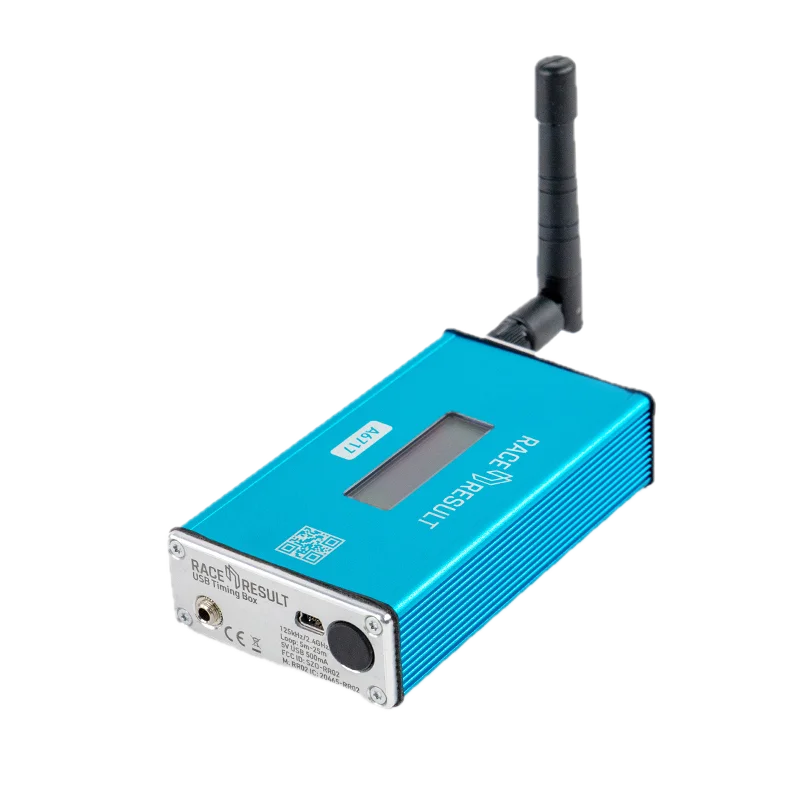
- A decoder — a RACE RESULT USB Timing Box or Ubidium that turns those reads into timestamped crossings. Either works; the two are compared below.
- A laptop running Roost MX Timing — sign-on, race control, live timing and results, all in one place.
Which decoder?
Roost reads both of RACE RESULT's decoders, and both give you the same timing. The difference is where the box can sit and how it is powered.
USB Timing Box
The simpler of the two, and the one most clubs start with. A single USB cable to the Windows laptop running the Roost bridge powers it and carries the crossings — there is no network to configure and nothing to charge. Roost reads it over FTDI's D3XX driver rather than a virtual COM port, so that driver is a one-off install on the timing laptop.
Ubidium
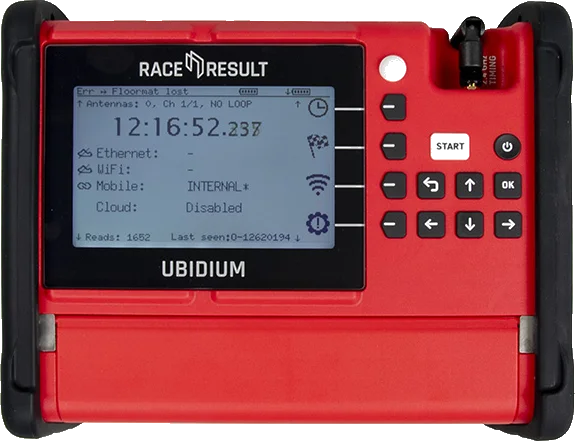
Runs from mains, DC, PoE or battery — about thirteen hours on one battery and twenty-seven on two — so it can sit out at the loop while the laptop stays in the tower. Three gigabit ports, WiFi and a SIM slot mean it reaches the laptop however your paddock is wired, and the 6.2″ screen stays readable in direct sun.
Every read it takes is numbered, and the numbering survives a reboot. The Roost bridge remembers the last number it saw, so a closed laptop or a kicked cable mid-moto costs you late reads rather than lost ones.
Transponders
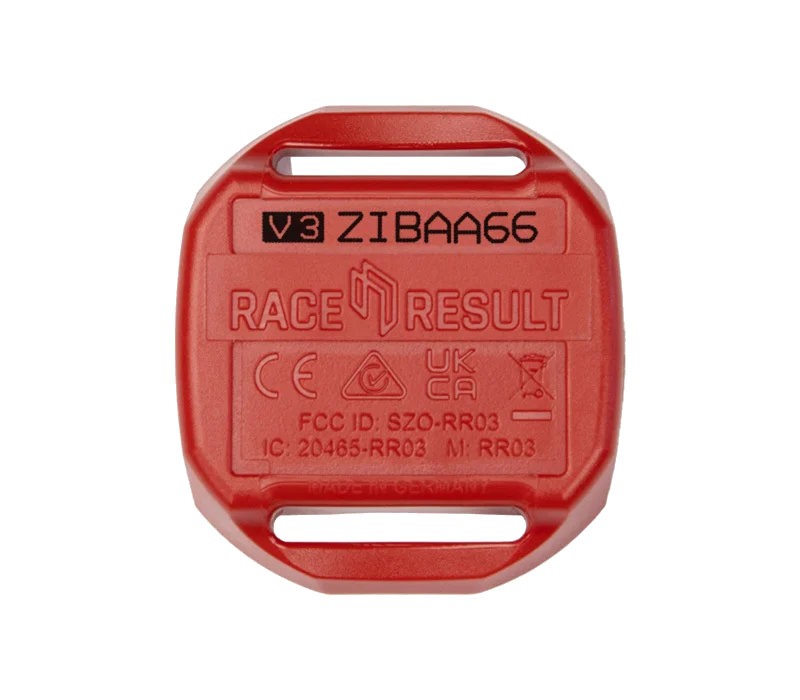
The current tag is the Transponder V3: active, 2.4 GHz, 36 × 40 × 9 mm and 17 g, held on by a cable tie or strap through two slots. It reads in any orientation, so there is no right way up to get wrong in the paddock, and the sealed battery lasts four to five years depending on model.
The ID is printed on the face. A rider reads it out at sign-on, you put it on their profile once, and the same tag works at every club running Roost. A club can keep a pool to hire out, or a rider can buy their own. Roost also reads the older 125 kHz tags, so nothing has to be re-chipped.
How transponder timing works
Every time a rider crosses the loop, their transponder is read and the decoder records a crossing — a tag ID and a precise timestamp. The software turns those crossings into lap times and live positions: the first pass registers the rider onto the track, and each pass after that completes a lap. Because it's timing to the tag, it doesn't matter how tight the pack is or who's a lap down — everyone is scored correctly.
Keep the loop flat across the line and clear of metal, and mount the box out of the weather with a clear run to the antenna. A tidy loop is the single biggest factor in clean, no-miss reads on race day.
Setting up the event
Before the gate drops you build the meeting once: create the classes, sign riders on and hand each one a transponder, and set the race order. Sign-on is where riders are matched to their tags and their class, so the moment they cross the line they're scored in the right place. From there, race control runs the day — arm a race, start it, and the crossings do the rest.
Race day: live timing on every phone
This is what changes the feel of a club meeting. As riders cross the line, positions and lap times update on a live leaderboard that anyone can open on their phone from a web link — no app to install. Parents on the fence, riders in the pits and the commentator all see the same live order, split by class. It turns "who's winning?" from a guess into a glance.
Championships and results
Points are worked out per class as each round finishes, and season standings add up on their own — including best-of drop-score projections when your series drops a rider's worst rounds. At the end of the day you print per-class results and trophy sheets straight from the same screen, ready for the podium.
When there's no signal
Plenty of tracks sit in a field with no bars. Roost MX Timing keeps timing through a full day completely off-grid — everything is logged locally on the laptop and the decoder — then syncs up when you're back in coverage. You never lose a crossing waiting for a connection.
Time your next meeting with Roost MX Timing
Open the live timing platform, or get your club set up for the season.
Riding rather than running the event? Read our two-stroke jetting guide →